Showing posts with label Organization. Show all posts

Friday, December 18, 2015

Door Sign Freebie!

Yesterday I added a FREE door sign to my TPT store. This is a simple sign that has only two options: come in and counseling in progress. Simply use a clip of any kind: a binder clip, a clothes pin, even a paper clip! It has a background that makes me think of Inside Out, but it is not from Inside Out. I recommend laminating this if you can, but it'll work with or without that. 
Click here to download this PDF file.


--------------------------------------------------------------------------------

If you would like a more detailed version of this, visit my TPT store. I have 4 non-editable versions of the wheel below as well as an editable version for a little bit more. This is the wheel I have on my door, which you can see in this post. 
Remember, my whole store is 10% off now through Saturday.                       Have a wonderful Christmas/holiday break!

Wednesday, December 9, 2015

Counseling Newsletter

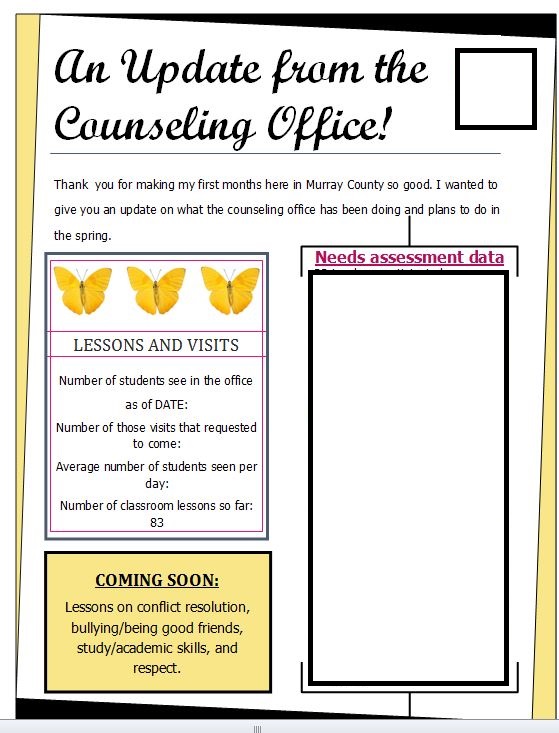
I mentioned in this post how I use Google Forms to survey the teachers to tell me how effective my lessons are. I take percentages from these to see how many teachers saw improvements or differences in their students. I am taking these and putting them into a newsletter I will send to my principals next week.

On my newsletter, I give data from the needs assessment I send out when we come in for pre-planning and what the teacher surveys said about my lessons. Since school started for me in September, I have done two lessons K-6 at both my schools. I have also done a tattling lesson for kindergarten.


Above are examples of what my letters look like. I've blocked out my data findings as well as my school system logo for privacy and security reasons. My lessons and visits section is still pending since there is still about a week left to see students (how is it that Christmas break sneaked up so fast?!).

For these letters, you could do anything is these boxes! I chose to do the data results from surveys, but you could include tips and tricks, cool things you learned at a conference, cool programs you are wanting to start, etc. I also send these letters jsut to my administrators, but I think making one for teachers would also be a great idea!


-----------------------------------------------------------

These letters were made using Microsoft Publisher. For your convenience, I have uploaded this file up to TPT. This item is now FREE! You can get a blank version of this form that already has all of these boxes and places for pictures.  You will need to have Publisher (it is a .pub file) and will need to know basic skills such as changing the pictures and re-sizing boxes as you need. But all the finding and placing is already done for you! See below for a look at what these blank ones look like: 


Tuesday, December 8, 2015

Google Forms

I love Google Forms! I use them often in my counseling program. To create one, go to or create a Google account to access Google Drive. Click on the red "New" button on the left hand side. It'll pop up with a few options, but I have to put my mouse over "More" to find Google Forms. It's a purple icon with a bullet list on it. 


At the start of the year I use a Google Form for my needs assessment. Using these are great for this because it will put your results into a spreadsheet for you. You can export this form to Excel if you'd like. It makes collecting data much easier!
For my program, I also use these for teacher reviews. I ask just a few questions about what they thought of the lesson and how it worked in their room. See below for a screen shot. I use these results in a newsletter I send to my administrators to demonstrate what I've been doing! I have one of these for every lesson I do. They are quick for me to make, and they are quick for the teachers. They take only a few seconds unless they choose to write me a novel in the last box!


More to come on that newsletter later! Do you use any sort of website or app that makes maintaining your program easier?

Wednesday, October 21, 2015

Individual School Binder

This is my last post in my series on binder organization. I have one last binder I use to keep myself organized. This binder stays at school, so I have a separate binder at each school with the same stuff in it for each school. The things I keep in these are school specific and are things I am unlikely to need while I am at the other school. Having two schools can be quite complicated! My stay at school binder is pink at one school and white at the other (so I won't get them mixed up if I do ever need to take them anywhere).


Again, the cover is available on TPT for FREE!

These also start with the ASCA model.
This is really my ASCA binder now that I think about it. This binder has 6 tabs. The first four are the ASCA model systems: foundation, management, delivery, and accountability. I keep these at the separate schools because my schools are very different. While my lessons are the same most of the time for my own sanity, the rest of my counseling program can look very different at each school.


These are the tabs in this binder:
  1. My foundation includes a copy of the county wide vision, mission, and beliefs as well as my own mission statement and program mission statement, vision, and beliefs. These have been adjusted to each location 
  2. Management has a copy of my school specific data from my needs assessment, and could also hold my calendars (I just use the one copy in my blue binder). 
  3. Delivery has my form where I keep track of which lessons I teach and when. This is particularly useful for when I do lessons teachers specifically request! You can find this in my notebook contents on TPT. It is one of several forms you can get in that pack. 
  4. Accountability is empty right now, but I will add any result reports I do here and anything else that looks at how effective my program is.
  5. I have a tab just for ASCA forms. I have the program audit, school data profile, , and a school counselor performance appraisal form 
  6. My last tab is a notes or other tab. The meeting notes page from my notebook contents is great to put here! 
That's it! That's all my binder organization. Do you keep an ASCA binder or notebook? How do you apply this model in your program?

Remember: ALL my items in my TPT store will be on sale 10-21-15 through 10-24-15! 10% off!

Tuesday, October 20, 2015

School Counseling Notebook

As I said in my last post, I am split between two elementary schools, so I have to be organized. This is the other binder that I carry in my backpack and have with me everyday no matter what school I'm at. It is blue, so I know all this stuff can be found in the blue binder! 


The cover can be found in my TPT store for FREE and is editable. :)

The very first page in my notebook is the ASCA model. 
After this are all my county wide documents: technology log ins and a password sheet, what to do if I lose my ID, and a list of phone numbers for the whole county. 


I have 8 tabs in this binder without a master list like in my lesson plan post. The first tab is for schedules.

Here I keep a list of kids that receive food from a local church donation each week and my classroom counseling schedules for both schools. I put a small post-it note at the back of each of my counseling schedules so they can be easily skipped.
Behind my schedules, I have all the schedules for both my schools: lunch, activities, school year event list, duty roster, etc. 


My second tab is for ethical codes and the ASCA National Standards. I have both ACA and ASCA code of ethics included. 

The third tab is special to my specific placement. In that state of Georgia, teachers are required to teach certain career lessons during the year from the Department of Education. I am in charge of making sure every student receives the lessons regardless of coming in later in the year or not, so this tab is used for that.
Next is my resources tab. I use my handy sheet protectors to keep the list of outside counselors in the area and who takes what type of insurance and Medicaid. I have learned so much about Medicaid and insurance in just a couple of months! I also keep some useful counselor tools in here, like my problem solving wheel:
I have an arrow put through with a brad, so kids can spin it to pick if they want. This is a clip art image that that can be found by searching "problem solving wheel." 
Lastly I have report samples in this tab: closing the gap results, small group results etc. that I can hopefully use to collect data this year or next year.


My fifth tab is my professional development and parent contact tab.  


I created my own parent contact document, which you can get for FREE here. As someone who doesn't have a set class, I need spaces for grades and teachers.


The sixth tab is also specific to my schools. It is my Exceptional Student Services (ESS) and Positive Behavioral Interventions and Supports (PBIS). I have the list of ESS teachers and contact information for the whole county as well as inclusion/co-teaching information form the county. PBIS is a county wide program we use, and it is fantastic. It is focused on early prevention of behavior problems. "The underlying theme is teaching behavioral expectations in the same manner as any core curriculum subject"_PBIS.org. Check out the website for more information, but we use this to teach appropriate behavior from the start, and it has dramatically reduced the number of office referrals in the county. 

Number 7 is my crisis plan. It is the one I wrote while in school, but it is a good reference if a crisis comes up. They don't happen very often, and an older plan is better than no plan. I hope to update this during the year to be adapted to the schools I now work in. 

My last tab is a miscellaneous tab. I keep overall needs assessment data for both schools combined here and some blank paper should I ever need to add anything anywhere else. 


Whew! That was a lot of info! I hope something in there was helpful. What works for you to organize your life as a school counselor? What special tabs do you use, or would you use if you used the binder method of organization? 

My cover and a notebook contents bundle can be found in the store on TPT. The notebook contents includes the free cover, binder cut outs for side view pockets in three sizes, counseling lesson documentation forms (more on this later!), a blank important info page, a password/log in page (a copy of the one I mentioned), meeting notes, professional development log, student referral form, and a 12 month calendar with NO dates or years, all in the same chevron print as the cover. While you have to fill in the calendar yourself, it can be used year after year. I use a good old fashioned planner, but I think I might use this if I were in just one school in the binder I leave at school (be on the lookout for that post coming soon!). 

ALL my items in my TPT store will be on sale 10-21-15 through 10-24-15! 10% off!


Monday, October 19, 2015

Lesson Plan Organization

I am split between two schools. That means I have to be on top of being organized! It's hard to know what I'll need day to day sometimes, but I use several binders for different things for school. Two go with me everyday and two live at school. More on that later, but my binders are color coded. I know that my green binder has lesson plans!
Today I will focus on how I keep my lessons and lesson plans organized. My secret? A binder with sheet protectors! I keep this notebook in my backpack and carry it with me each day to whichever school I'm at, so I always have it. I always have at least one hard copy of anything I need to make copies of. I put extra copies in the front flap. You can also stick books in here if you use those and have a hard time remembering to take them. I usually just put my books I use in my lessons on top of this binder so I remember to take it with me, but whatever works for you!


I have my lesson plans right in the front so I can easily look them over before preparing to do a lesson and see what materials I need. After these, I have a list of tabs that tell me where each lesson can be found. The tabs are a 12 pack from Walmart, but you could use any you have on hand. and make your own table of contents of sorts.


Each tab is assigned a different lesson. Right now I only have a few created. Under each tab I put the documents I need for activities or anything else I may need under that tab in a sheet protector. This keeps them in good shape and doesn't require holes in the document itself. 


I have a colorful cover cover on the front of my binder. You can download a FREE editable file from my TPT store if you're interested in the blue chevron!

How do you keep your lessons organized? I'd LOVE to hear what works for others!